Two of the biggest deductions a sole trader has — running a business from home, and driving to see clients — both come down to the same question: what percentage of this was actually business? Here’s how to work that number out for each, what a logbook needs to hold up if you keep one, and the shortcut if you’d rather not.
1. It comes down to one number: your percentage
If something serves both business and private life — your home, your car — IRD only lets you claim the business-use share of it, not the whole thing. That share is a single percentage, and it’s the one number that decides how much of your home office and vehicle costs actually count.
(IRD also offers flat statutory rates — a square metre rate for home office, a kilometre rate for vehicles — as an alternative to working out a real percentage of real costs. This guide focuses on the percentage method, since that’s the one that matches apportioning your actual running costs, the way most sole traders already track things.)
2. Home office: working out your %
Your home office % is the size of the space you use for business, divided by your home’s total area. A dedicated 10m² office in a 100m² home is 10%. If the space is shared — a dining table that doubles as a desk, say — you can adjust that down further for the proportion of time it’s actually used for business rather than family life. That’s the one percentage that applies everywhere below, except landline/internet and mobile phone — those each get their own business-use % based on actual usage, not your home office %.
Once you’ve got the percentage, it applies to:
- Mortgage interest, rates, or rent — whichever applies to you (never both).
- Power, water, and other running costs for the home.
- Landline and internet — apportioned at their own business-use %, based on how much you actually use them for work. This can be a different percentage from your home office %, since it’s not tied to a room the way power and rates are.
- Mobile phone — same idea, its own business-use % based on actual usage, which can differ again from both your home office % and your landline/internet %.
Plus, separately, depreciation on any office furniture or equipment (desk, chair, monitor) at your home office %.
3. What you can claim on home office — the full list
✅ Claimable
- •Power, gas and other energy costs (home office %)
- •Water rates or water usage (home office %)
- •Council rates (home office %)
- •Mortgage interest OR rent — never both (home office %)
- •House and contents insurance (home office %)
- •Landline and internet (own business-use %, can differ from your home office %)
- •Mobile phone (own business-use %, can differ from both of those)
- •Repairs to the office space itself — e.g. repainting that one room
- •Depreciation on office furniture and equipment (desk, chair, shelving)
- •Cleaning costs for the home office area
❌ Not claimable
- •The house’s purchase price, or any mortgage principal repayment
- •Depreciation on the building itself — currently 0%, residential or commercial
- •Capital improvements, renovations, extensions or structural work
- •General household costs unrelated to the office space
- •The private-use share of anything mixed-use
4. Vehicle: working out your %
Same idea, different basis: your vehicle percentage is business kilometres divided by total kilometres driven, over a representative period. It applies to every running cost — fuel, insurance, registration and WOF, repairs and servicing — plus depreciation on the vehicle itself as a capital asset. A vehicle used only for business claims 100%; most sole traders are somewhere in between.
5. What you can claim on your vehicle — the full list
✅ Claimable
- •Fuel — petrol, diesel, or EV charging
- •Road User Charges (RUC) for diesel and electric vehicles
- •Servicing and regular maintenance, tyres
- •WOF and registration/licensing
- •Repairs
- •Insurance premiums
- •Lease payments, if leasing rather than owning
- •Interest on vehicle finance or a loan — interest portion only
- •Depreciation on the vehicle (actual-cost method)
- •Parking and tolls incurred on a business trip
❌ Not claimable
- •Fines, parking tickets and infringement notices — never, regardless of business use
- •Vehicle loan principal repayments — only the interest is deductible
- •Commuting between home and a fixed, regular business premises (see note below)
- •The private-use share of every cost above
- •The full purchase price claimed outright over $1,000 — depreciate it instead
On commuting: if you’re home-based, trips from home to a client or job site count as business travel — home is your base of operations. If you have a separate business premises you travel to each day, that regular commute itself is private, not business, even though everything you do once you arrive is.
6. Keeping a logbook — the 90-day rule (and the 25% shortcut)
A logbook is simply how you establish that percentage in a way that holds up if IRD ever asks. The rules, straight from IRD:
- Keep it for at least 90 consecutive days — a representative stretch of normal driving, not your busiest or quietest month.
- Record the start date and odometer reading on day one, and the end date and odometer reading 90 days later.
- For every business trip in between: the date, distance, and reason for the journey.
- The resulting percentage is then valid for up to 3 years — as long as your actual business use doesn’t shift by more than 20% in the meantime. If it does (a new client base, a second vehicle, a change in how you work), you need a fresh 90-day logbook before the 3 years are up.
It doesn’t have to be a paper diary — a spreadsheet, a notes app, or a logbook app all count, as long as they capture the detail above. Barnaby doesn’t come with a built-in 90-day logbook feature itself — but there are plenty of third-party logbook apps out there that will do the trip-by-trip tracking for you and spit out the resulting percentage, which is the one number you then need here.
Same underlying idea applies to home office — there’s no logbook involved there, but the same principle holds: a reasonable, defensible estimate is fine, and you don’t need to justify it down to the decimal.
How Barnaby helps
Once you’ve worked out your percentages, Barnaby takes care of applying them — so you’re not doing the same maths on every single transaction.
Once you set it up there — in Business Settings — your home office % is applied automatically across every home office category — rent or mortgage interest, power, water, and (by default) landline/internet and mobile phone too. Your vehicle business use % works the same way, applied automatically across every vehicle-related category. Landline/internet, mobile phone and individual categories can each still be edited to their own real percentage afterwards, in Rules & categories, if your actual usage is different from the default.
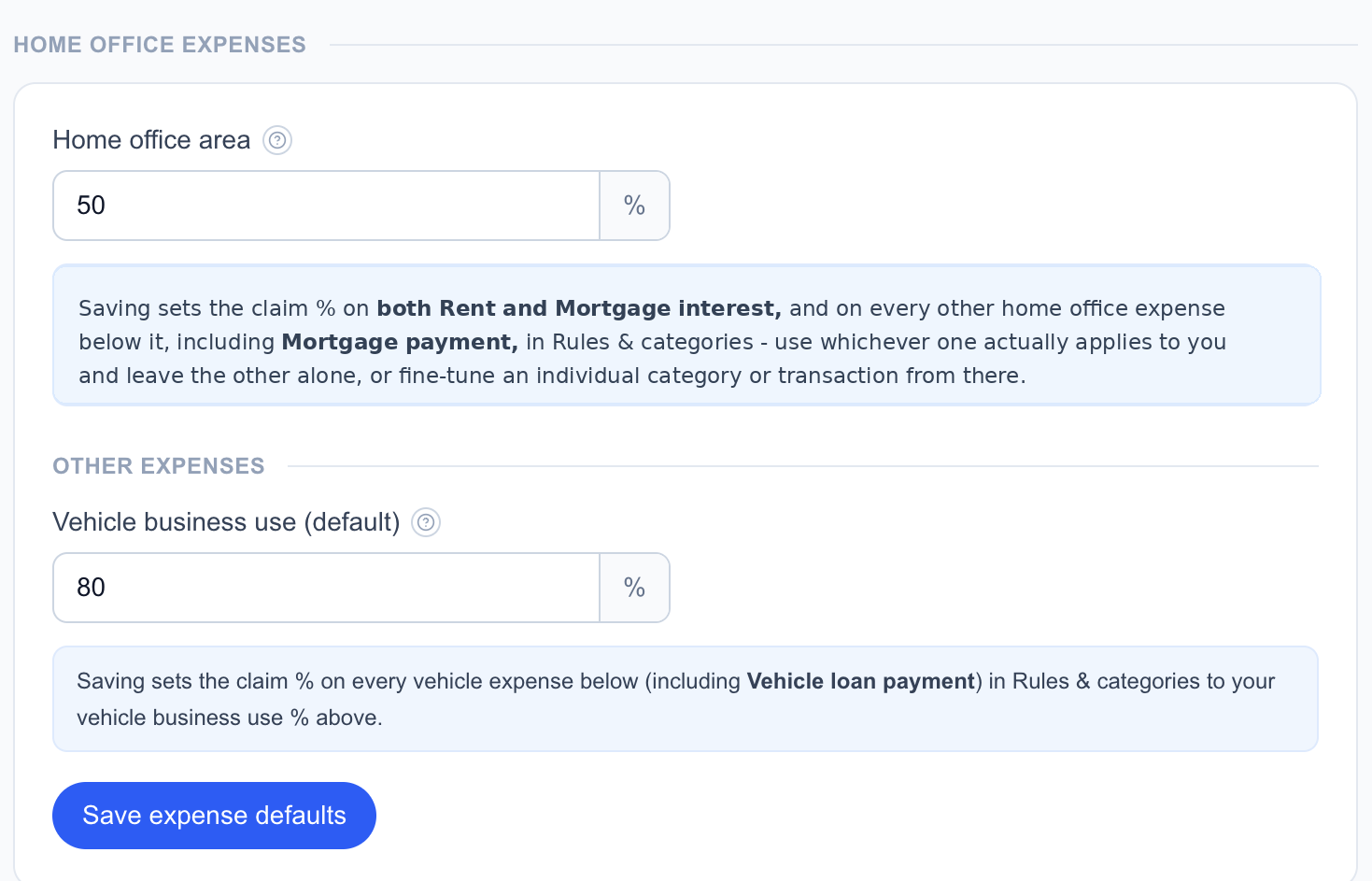
After that, you simply apply the relevant category to the transaction — Barnaby calculates the claimable amount and the GST for you.

Deliberately, the app doesn’t build a day-by-day logbook feature — it’s not trying to replace the 90 days of trip-by-trip record-keeping above. Do that however suits you (paper, spreadsheet, or one of the third-party logbook apps mentioned above), and once you’ve got your resulting percentage, that’s the one number the app actually needs.
See it for yourself
Set your home office and vehicle percentages once, and let every linked transaction apportion itself automatically.
Get startedWant the bigger picture first? Read the full Sole Trader Tax in New Zealand guide, which covers income tax, GST, ACC and provisional tax together.
This is general information, not personalised tax advice. Rules above are current as of September 2026, and they change most years — always check current figures at ird.govt.nz or with an accountant before relying on them for a real decision.